


QR Code Scanner & Scanner App
4.75.40K Reviews
App Specs
- Version
- 1.7.0
- Updated On
- License
- Free
- Downloads
- 100,000,000+
- Developer
- QR Code Scanner.
- Categories
- Tools
- Platform
- Android, iOS
Screenshots


 Analysis by AppCompare
I judge a scanner less by how many buttons it offers than by whether it helps me act on a code without making a simple errand feel like a technical task. QR Code Scanner & Scanner App is aimed squarely at that everyday job: read a code, show what it contains, and let me decide what to do next. Its uncluttered approach is appealing, though it is best for people who want a dedicated scanning tool rather than a broad document or phone-management app.
A focused tool for everyday scanning
This is a free tools app from QR Code Scanner, rated for Everyone. Its appeal is easy to understand: a QR code on a menu, parcel, poster, or product is useful only if I can read it quickly and make sense of the result. The app has a 4.4 average from around 493,000 ratings, and it has passed 100 million installs, so it is a well-established option in a crowded category. Those figures suggest broad use, but I would still choose it based on whether its straightforward workflow suits me.
The app was released on April 30, 2021, and version 1.6.6 supports Android 6.0 and later. I like that the basic purpose is clear rather than buried under a collection of unrelated tools. Its developer is QR Code Scanner, and the app’s simple presentation makes it approachable for someone who does not scan codes often as well as for someone who uses them throughout the week.
Where a quick scan earns its place
A practical way to use a scanner is to pause before opening whatever a code points to. If I scan a code on a flyer, for example, I can first check whether the result is the event page I expected instead of treating every printed square as trustworthy. That small habit matters: scanning and deciding are separate steps, and I prefer an app workflow that makes the decoded result visible before I follow it.
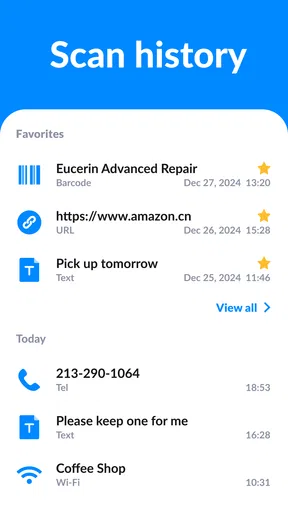
For a household task, I might scan a code on packaging to revisit a product page, or keep a link from a notice so I can check it later. A history list is especially useful when I am interrupted after scanning: rather than searching the original poster or box again, I can return to the item in the app. I would still treat history as a convenience, not as a permanent archive; if a link matters, I save it somewhere I already use for important notes.
Useful beyond camera reading
The app also includes QR-code creation for website addresses, contact information, and plain text. That makes it more flexible than a reader I would open only when someone else has printed a code. I could make a code containing a web address for a small event handout, or share a short piece of text without asking someone to type it character by character. Before sharing, I would scan my own code and check the result; a quick proofread is easier than distributing a code with a typo in its contents.
For anything private, I would think carefully about what I put into a code before sharing or displaying it. A QR code is a convenient way to carry information, but convenience does not make the information suitable for public viewing. Contact details or other personal material should only go into a code when I am comfortable with the people who may scan it and with where it will be displayed.
Worth Reading Before You Choose

Baby Panda World Brings Quick Play to Modern Phones, but Its Game Library Feels Busy

ESPN’s Live Game View Makes Following Close Games Easier

QuizzLand Review: A Good Fit for Short Trivia Breaks, Not Every Player

Basketball Stars: Multiplayer Is Fast, but Can It Recover When Matches Go Wrong?

WEBTOON Turns Phone Updates Into a Better Reading Routine

Link to Windows Runs on Shared Habits, Not Social Feeds
Simple operation, with sensible limits
The app’s focused layout should be useful when I want to scan without first learning a complicated interface. It is also a different proposition from a phone’s built-in camera, which may already recognize QR codes and is often the quickest option when I only need an occasional scan. I would try the camera first if it does the job reliably; a dedicated app makes more sense if I want code creation and a separate scan history in the same place.
It is not a replacement for a document scanner. Someone who needs to capture receipts, crop pages, or organize paperwork should look for an app built around documents. Likewise, a person who only scans a code once in a while may not need another app at all. The useful distinction here is not that every scan requires a dedicated tool, but that this one combines routine code reading with a few related tasks.
Getting Started with QR Code Scanner & Scanner App
First things first, downloading the QR Code Scanner & Scanner App was a breeze. Available on both Android and iOS, it took just a few clicks, and there it was, ready to go on my phone. The app's interface is simple and intuitive, which I absolutely love. No need to fumble around trying to figure out what button does what. It’s all laid out clearly.
Once I opened the app, I was greeted with a sleek and minimalistic design. At the center, there's a big button labeled "Scan," making it abundantly clear what the main function of this app is. I appreciate that the developers didn't clutter the screen with unnecessary features. It’s all about getting the job done, and getting it done fast.
Scanning in a Snap
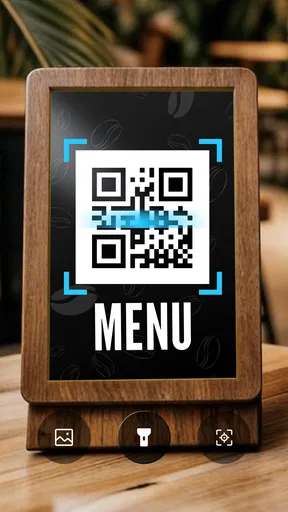
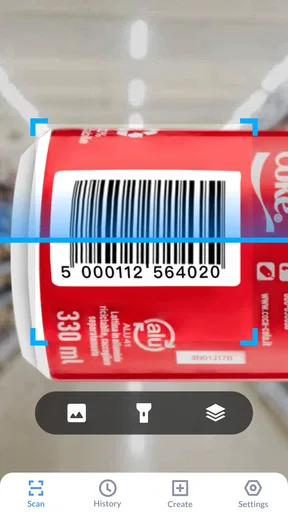
Now, onto the scanning experience itself. I started with something easy—a QR code on a cereal box. I simply pointed my camera, tapped the "Scan" button, and bam! Instantly, the app decoded the QR code and displayed the URL it contained. I was genuinely impressed by how fast it processed the information. No lag, no fuss.
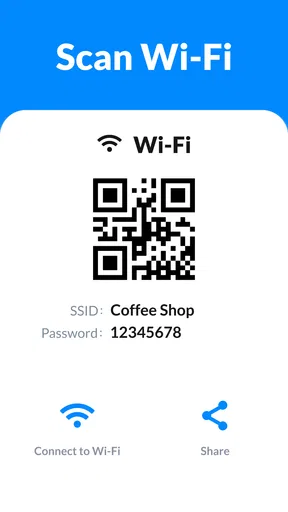
Feeling ambitious, I decided to try something a bit more complex: a QR code that led to a Wi-Fi network login. Again, the app performed flawlessly. It even prompted me to connect to the network directly from within the app. Talk about convenience!
Beyond Just Scanning
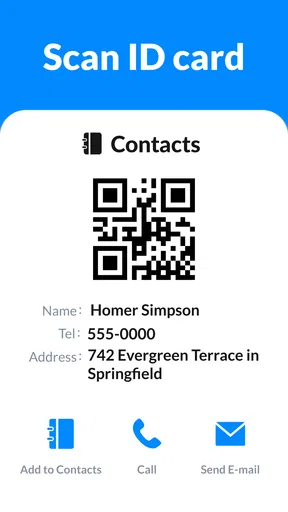
While the primary function of the app is to scan QR codes, it offers a few additional features that are worth mentioning. One of my favorites is the option to create your own QR codes. Whether it's for a website, contact information, or even plain text, the app lets you generate and customize QR codes easily.
There's also a history feature that keeps track of all the codes you've scanned. This is super handy if you need to refer back to something you scanned previously. No more racking your brain trying to remember that link from last week.
User Experience and Functionality
The app runs smoothly, with no crashes or bugs during my testing period. It’s lightweight, so it doesn’t hog your phone’s resources, which I truly appreciate. Battery consumption is minimal, so you won't find your phone dying on you unexpectedly.
One small thing I did notice is that it requires permission to access your camera and storage. While this is expected for an app of this nature, it's always good to be aware of the permissions you're granting.
What to expect before installing
The app is free to download, with in-app purchases listed at $4.99 per item. I would start with the free experience and only consider paying if an option I actually want is clearly presented; there is no reason to assume a purchase is necessary for an occasional scan. If you are comparing scanner apps, check the current in-app prompts and make that decision based on your own needs rather than on the idea that a paid option must scan better.
Camera access is central to scanning, so I would expect to grant that permission when using the feature. The original review also noted a request for storage access. I make a habit of checking permission prompts and allowing only what makes sense for the task. If I deny camera access, scanning through the camera cannot work as intended; if a permission request appears at a moment that does not seem relevant, I would pause and review it rather than tap through automatically.
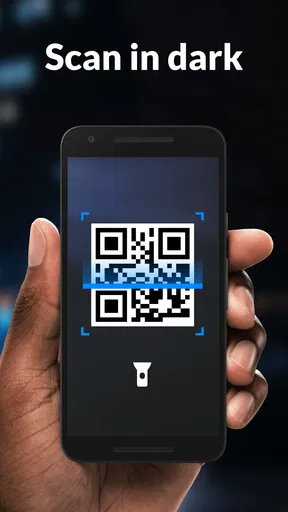
In a busy shop, I would use the app in a simple sequence: open the scanner, frame the code steadily, read the result, and then choose whether to continue. If the code is glossy, tiny, or poorly lit, moving the phone slightly or changing the angle can help reduce glare and keep the code in focus. I would not keep tapping rapidly if a scan fails; first I would check the lighting and distance, since a clearer view is usually more helpful than repeating the same attempt.
At a café, for example, I might scan a menu code while a friend is choosing a table. I can inspect the displayed destination before opening it, then keep the scan in history if I want to revisit it after ordering. That is a small but realistic benefit: it avoids juggling a camera view and trying to remember a link later. Still, if the venue has a printed menu or its own trusted app, those may be simpler choices for someone who does not want to scan a code.
One trade-off with a dedicated scanner is that it adds a separate step compared with a camera app that recognizes codes directly from the viewfinder. In return, this app brings code creation and scan history into a purpose-built place. I would recommend it to people who use QR codes repeatedly, make simple codes to share, or want a record of recently scanned items. I would skip it if my phone’s built-in camera already covers my occasional needs, or if I need advanced organization, document capture, or a more specialized business workflow.
Final Thoughts
The QR Code Scanner & Scanner App is a robust tool that does exactly what it promises. It's fast, reliable, and easy to use. Whether you're a tech-savvy individual or someone who's just looking for a straightforward way to scan QR codes, this app fits the bill perfectly.
If you're in the market for a QR code scanner, I'd say give this one a try. It’s definitely earned a spot on my list of must-have apps. So go on, download it, and make your life a little bit easier. You'll thank me later!
Pros
- Fast and reliable scanning capabilities.
- User-friendly interface for easy navigation.
- Supports multiple barcode formats.
- No internet connection required.
- Customizable settings for advanced users.
Cons
- Contains ads in the free version.
- Limited features without premium upgrade.
- Occasional false positives in scanning.
- Some features hidden behind paywall.
- Requires camera permission to function.
FAQs for QR Code Scanner & Scanner App
How does the QR Code Scanner & Scanner App work?
The QR Code Scanner & Scanner App operates by utilizing your device's camera to quickly read and decode QR codes. Once a QR code is scanned, the app translates the data embedded within the code into a readable format, whether it's a URL, text, or other information, providing an intuitive and seamless user experience.
Is the QR Code Scanner & Scanner App free to use?
Yes, the QR Code Scanner & Scanner App offers a free version with essential scanning features. However, it may contain ads. For users seeking an ad-free experience or additional features, a premium version is often available for a small fee, offering enhanced functionality and support.
What types of QR codes can this app scan?
The QR Code Scanner & Scanner App is designed to scan a wide variety of QR codes, including those that link to websites, Wi-Fi networks, contact information, calendar events, and more. It ensures compatibility with the most common QR code formats, making it versatile for both personal and professional use.
Is the app safe to use for scanning QR codes?
Yes, the QR Code Scanner & Scanner App is safe to use. It prioritizes user security by not automatically executing any actions from scanned QR codes. Users are prompted to confirm any actions, such as opening a link. This precaution helps prevent phishing and other security threats.
Does the app require an internet connection to function?
The QR Code Scanner & Scanner App can scan codes without an internet connection; however, accessing online content linked within a QR code will require connectivity. For example, scanning a code that directs to a website would need an internet connection to open the link in a browser.


